The box says “C-wire required,” and now you’re staring at a bare wall plate wondering what that means. Here is the short answer.
Do you need a smart thermostat C-wire adapter? You need a C-wire adapter only if your thermostat cable has no usable common wire and the smart thermostat you bought can’t run without one. The C-wire gives the thermostat steady 24-volt power. Check for an unused wire in the cable first. If none exists, an adapter kit or a new wire fixes it.
Our stance is simple: check first, buy second. Plenty of homes already have the wire they need, and a part you don’t need is money wasted. If you’d rather skip the guesswork, we handle this every day through our thermostat installation and replacement service. We are a family-owned HVAC company serving Gilbert, Queen Creek, Apache Junction, and the greater East Valley, and thermostat wiring is part of our regular work.
Below you’ll find five signs you need a smart thermostat C-wire adapter, three signs you don’t, a five-step check, four fixes, and an honest word on when to put the screwdriver down.
What does a C-wire do for smart thermostats?
The C-wire (common wire) completes a 24-volt circuit back to your system’s transformer. A smart thermostat has a screen and Wi-Fi, so it needs steady power. Old thermostats ran on batteries or tiny trickles of power. Smart ones need a constant supply.
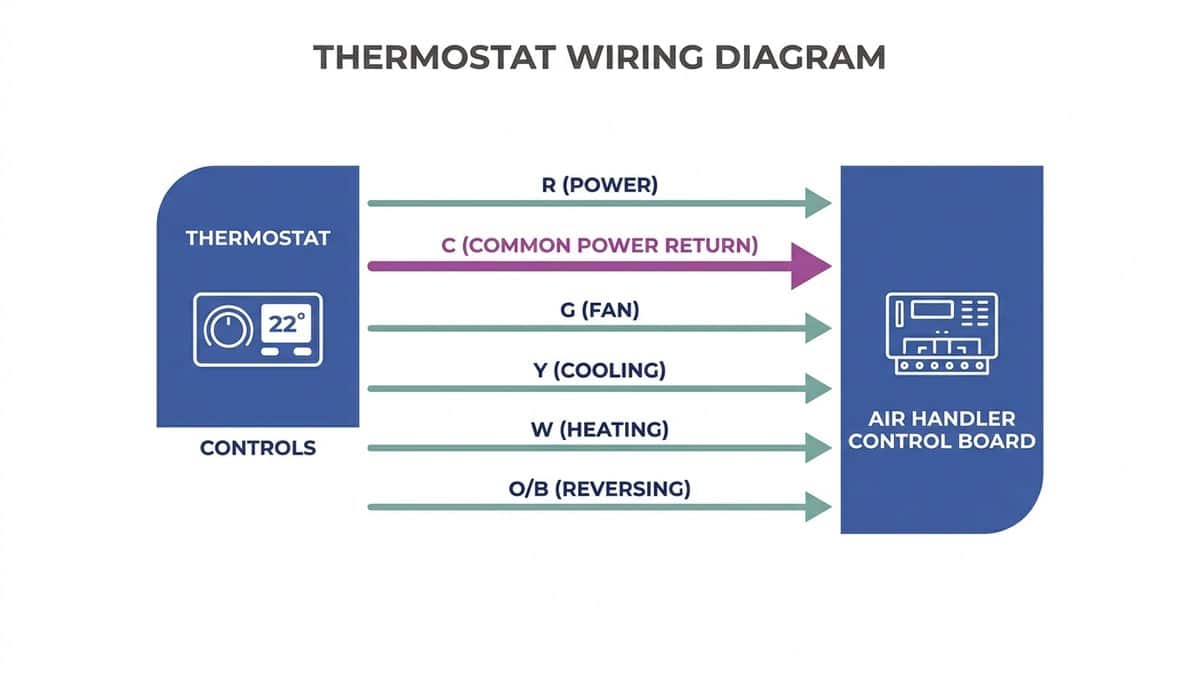
That is the heart of smart thermostat power requirements. Think of the low-voltage cable as a small bundle of single-purpose wires. Each one carries a signal or power for one job. You’ll see these letters on the terminals:
- R: power from the transformer
- C: the common wire that completes the circuit for steady power
- G: the fan
- Y: cooling
- W: heat
- O/B: the reversing valve on a heat pump
Without a C-wire, many thermostats “steal” a little power through the other wires. This is called power stealing. It can work fine on a simple system. It can also cause trouble: random reboots, Wi-Fi drops, a faint hum or click at the equipment, or short cycling, where the system turns on and off too often.
We see the practical side of this on installs. Our licensed crew verifies thermostat operation before we leave, and we walk homeowners through programming so the new thermostat actually gets used. A thermostat that powers up and then glitches a week later isn’t finished work. If you want to know why the upgrade can be worth it, we’ve covered how smart thermostats cut Arizona summer cooling costs.
Takeaway: The C-wire is a steady power line, and smart thermostats work best when they have one.
Do you need a smart thermostat C-wire adapter?
Here is the core of it. You need an adapter if your thermostat has no C wire connected, your cable has no spare wire to use, or your new thermostat says it requires one. If a spare wire already sits in the cable, you probably need no adapter.
Every thermostat installation C-wire question comes down to the same two things: what your wall already has, and what your new thermostat demands. Here is how to read the signs.
5 signs you do need an adapter
- No wire sits on the C terminal. The terminal is empty, and the thermostat expects a connection there.
- The cable has no spare wire. Every wire in the cable is already in use, so there is nothing to repurpose.
- The setup or compatibility check says C is required. The maker’s own app or box is the final word on what that model needs.
- An existing smart thermostat reboots, loses Wi-Fi, or shows low-power warnings. That pattern often points to weak power at the thermostat.
- The AC hums, clicks, or short cycles after a thermostat swap. The new unit may be pulling power in a way the system doesn’t like.
3 signs you don’t need one
- A spare wire is already in the cable. Connecting it at both ends may solve the whole problem for free.
- A C-wire is already connected at both ends. Then the thermostat has what it needs.
- The thermostat is built to work without one, and your system is simple. Some models are designed for this, and a basic single-stage system is the easiest case.
We want to be honest here. Many homeowners buy an adapter kit before they’ve looked behind the plate. That is how people end up with a part they didn’t need. In our work across 3,000+ installs, we’ve seen that the cheapest fix is often the wire already hiding in the wall.
If your current thermostat is old, that may also be part of the story. It helps to know how long a thermostat typically lasts before deciding whether to upgrade now or later.
Takeaway: A smart thermostat C-wire adapter is a fix for a missing wire, not a default purchase.
How do you check for a C-wire?
Turn the system off, pull the thermostat faceplate, photograph the wires, and look for a wire on the C terminal. Then look inside the air handler or furnace for the same wire. A spare, unconnected wire tucked behind the plate often works.
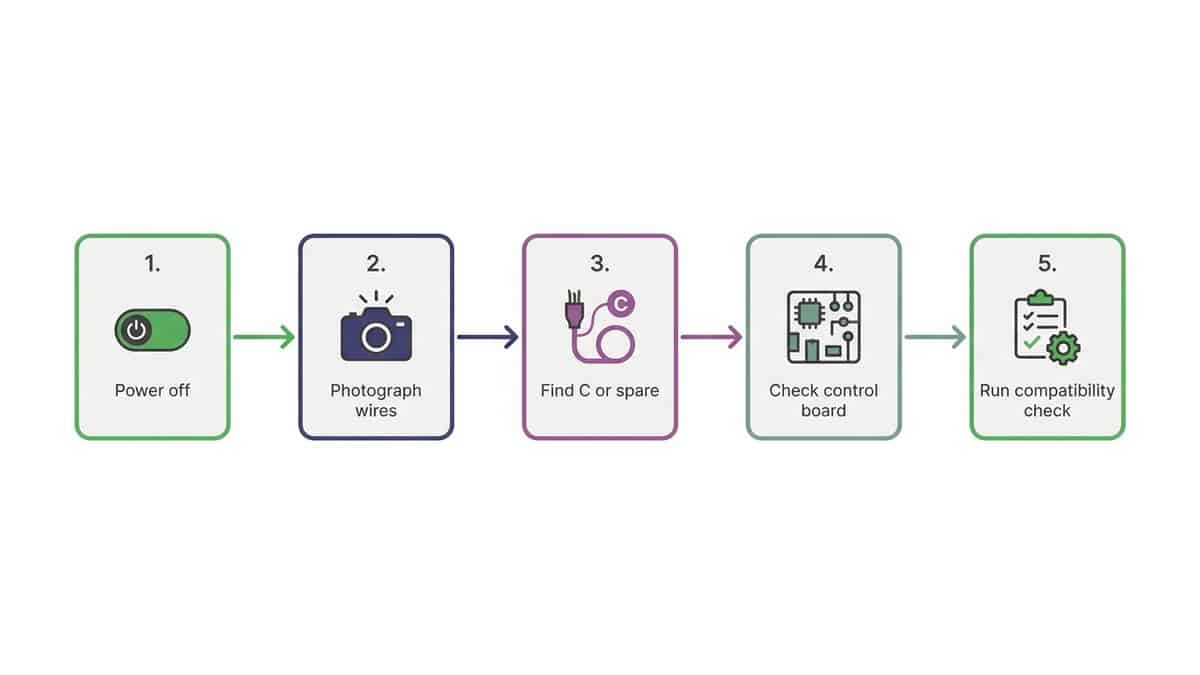
Here are the five steps, in order.
- Turn off the system at the thermostat and at the breaker. Low-voltage wiring is gentle, but the equipment it connects to is not. Cut power at both places before you touch anything.
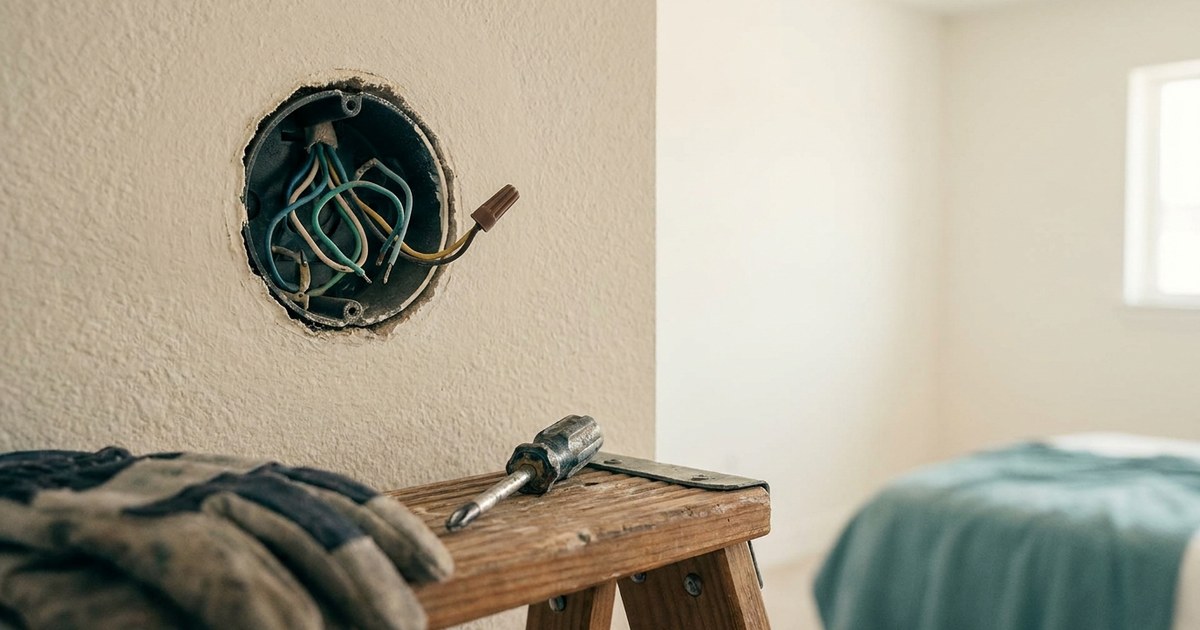
- Pull off the faceplate and photograph the wiring. Take a clear photo before you disconnect or move a single wire. This photo is your undo button.
- Look for a wire on the C terminal, then for a spare behind the plate. Spare wires are often folded back into the wall. Count the wires in the cable and compare that to the ones in use.
- Check the control board at the air handler or furnace. The wire has to land on the C terminal there too. A wire connected on only one end does nothing.
- Run the thermostat maker’s compatibility check with your photo. Most makers offer a quick online or in-app checker. Use it before you buy anything.
A few East Valley notes. The air handler is often in a hot attic, so do this in cooler months or cooler hours. Mid-November is a good time. Also, don’t trust wire colors. Colors are a convention, not a rule, and a previous installer may have used whatever was on hand. Match each wire at both ends, not by color alone.
We serve homes across the East Valley, from older Mesa neighborhoods to newer Queen Creek builds, and we see a mix of everything in those walls. That’s why we always tell people to photograph first. It also fits how we work on installs: before we leave, we walk the customer through how the thermostat operates so nothing feels like a mystery.
Takeaway: A careful look and a photo can answer the C-wire question for free.
What are your 4 options without a C-wire?
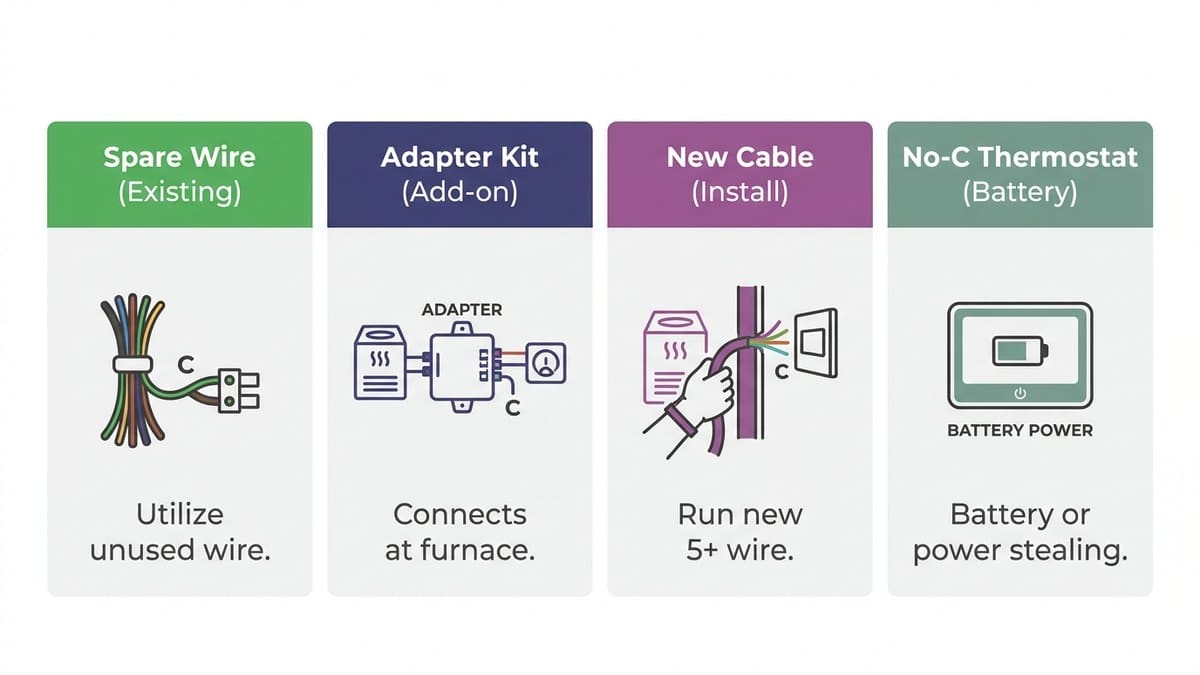
Four fixes work: use a spare wire in the cable, install an adapter kit at the equipment, run a new thermostat cable, or pick a thermostat built to run without a C-wire. The right fix depends on your cable and your system.
Here is each option with who it suits and its catch.
- Use a spare wire in the cable. This is often the cheapest fix and needs no new part. You connect the spare to the C terminal at the thermostat and at the control board. Best for: homes with a cable that has an unused wire. The catch: you need to be sure you’ve matched both ends, and you’ll be opening the air handler or furnace.
- Add a power adapter kit (power extender) at the equipment. This is the usual answer for a smart thermostat C-wire adapter question. The kit lets the existing wires carry steady power. Best for: cables with no spare wire. The catch: it means opening the air handler or furnace, and it won’t suit every system.
- Run a new thermostat cable. This is the cleanest long-term fix. Best for: homeowners who want a reliable setup for years. The catch: it can mean attic or wall work, which is where many people decide to call a pro.
- Choose a thermostat designed to run without a C-wire, or have a pro match one to your system. Best for: simple systems where you’d rather not touch the equipment. The catch: these models may give up some features, and they aren’t right for every system.
We offer thermostat wiring alongside our other HVAC work, so we can look at your setup and tell you which of these fits. If you’re weighing the whole project, we’ve written about what a thermostat installation and replacement involves.
We also try to be plain about which fixes are DIY-friendly. Using a spare wire is usually within reach for a careful homeowner. Opening the equipment or running new cable is where we’d rather you called.
A part that is cheap isn’t a good deal if it’s the wrong part.
Takeaway: Start with the free fix, and move to a smart thermostat C-wire adapter or a new wire only when the cable gives you no choice.
Which Arizona systems make thermostat wiring trickier?
Most single-stage systems are straightforward. Some are not. Thermostat wiring gets harder when your equipment needs more than a basic thermostat provides.
- Heat pumps. These use an O/B wire to control the reversing valve. If it’s connected wrong, the system can heat when you want cooling. In a hot East Valley summer, that’s a problem.
- Two-stage and variable-speed systems. These need more control signals than a basic thermostat provides. A thermostat that can’t speak to the system will leave comfort and efficiency on the table.
- Older homes with thin or short cable. Older cable may have no spare wire, or too little slack to work with.
- Attic air handlers. The wire you need to reach may sit in serious heat, which makes the job slower and less pleasant.
Matching the thermostat to the system matters as much as the wire. We install heat pump AC units and work on all makes and models of air conditioning and heating systems, ductwork, and thermostats, so we see these combinations often. Old mechanical thermostats also lack the precision of modern digital models, and they can’t connect to home automation, which is one reason an upgrade can pay off through better control and scheduling.
You can see the full range of what we do on our page for residential and commercial HVAC services in the East Valley.
If your system is also getting old, a new thermostat may be a small part of a bigger decision. In that case, AC installation and replacement in the East Valley is worth a look before you spend on controls for equipment near the end of its life.
Takeaway: The more complex your system, the more the thermostat choice and wiring need to match it.
When should you call an HVAC pro?
Call a pro if you can’t identify the wires, the air handler is in a hot attic, your system is a heat pump or multi-stage unit, or the AC acts up after the swap. A wrong connection can leave you without cooling.
Many swaps are DIY-friendly. If you have a clear photo, a spare wire, and a simple system, you may not need us at all. We’d rather say that than sell a visit you don’t need.
Here is a short “call us if” checklist:
- You can’t tell which wire goes where, even with your photo.
- The cable has no spare and you’d need to run new wire.
- You’d have to open the air handler or furnace and aren’t comfortable doing it.
- You have a heat pump, a two-stage system, or a variable-speed system.
- The system won’t cool, or it hums, clicks, or short cycles after the swap.
That last one matters most in the East Valley. If the AC quits in the heat after a DIY swap, you don’t want to wait. We offer 24/7 emergency and same-day service, and our owner is on the job, so you’re talking to people who answer for the work. You’ll get a straightforward quote before work begins.
If something is off, AC repair and HVAC upgrades across the East Valley is what we do every day.
Takeaway: Putting the screwdriver down early is cheaper than a no-cooling emergency in July.
Check first, then decide
Start with the free steps. Turn off the power, photograph the wires, look for a C-wire or a spare, and run the maker’s compatibility check. Most of the time, that tells you whether you need a smart thermostat C-wire adapter at all, and which of the four fixes fits.
If you’d like a second set of eyes, we’re glad to help, whether that’s a quick question or the full job. See our full range of AC and heating services to learn more.
Not sure what’s behind your wall plate? Call us and we’ll tell you what you need and what you don’t.